Hosting of HTML, JavaScript and CSS files Method-1
It has been asked from me time and again through email, phone calls and by commenting in such post from my visitors about hosting of HTML, JavaScript and CSS file. In this post I will guide you complete tutorial about how can we upload HTML, CSS and JavaScript file on Google Drive. As I have seen all the blogger are creating nowadayswidget generators and due to copying/stealing of Generator such bloggers try to hide and escape our script and style sheet from being copied. So in this tutorial I will guide you about where can we host HTML, CSS and JavaScript files easily. in few days I will post another method for so subscribe us and don’t miss for that one.


Hope all you have understand about how and where to host HTML, CSS and JavaScript File easily. For any further assistance you can ask by replying in this post as soon as possible you will get reply.
Another Related Articles for You
How and Where to Host HTML, CSS and JavaScript File (Video Tutorial).
Here I will highly recommend you for this method to use Google Drive. Its very easy to use and safe for uploading and hosting of CSS, JavaScript and HTML files.
First of all what this video
I think you have understand how can we upload or host JavaScript Files on Google Drive.
Benefits of Hosting Files on Google Drive.
As I have already posted regarding this topic topic in two different posts (check above in the related posts). But something I should mention here about the benefits and why we should use Google Drive for hosting File and CSS JavaScript or HTML.
- 1- Google Drive provides us upto 5GB Space free and maximum bandwidth. If case of storage full you can easily upgrade your account and get another space.
- 2- Google Drive allow us to upload all type of file such as spreadsheet and presentation Videos with the embedding option (I will post about it later).
- 3- Google Drive has also designed an option of privacy for its server. You can easily make any file or folder Public, Private or Shared with Just Specified Peoples.
- 4- You can share your file on Google Plus, or wherever you want easily.
How to Host CSS file on Google Drive (Step by Step Tutorial).
As I have shown above you complete tutorial in my video, about the same topic here is manual guide.
1-First of copy any CSS or JavaScript and paste in Notepad
2-And save it with the name of yourcssfilename.css means with extension of CSS “.css”
3-Now go to Google drive and create a public folder.
4-Then upload CSS file which you have made from the Style in Public folder.
5-Now here is the main thing which I am trying to share as I have highlighted above the id of each uploaded file on the googledrive now what you have to do for sharing this CSS file by embedding follow the giving below tips.
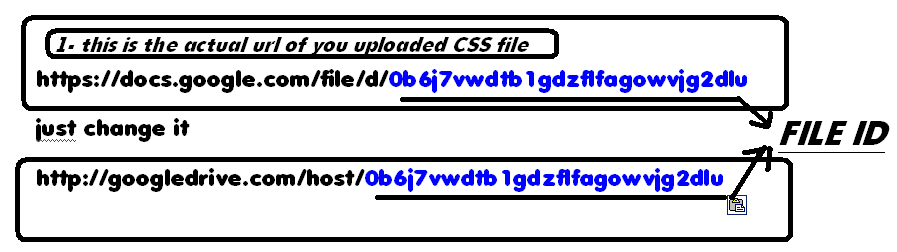
And embed the link as per give blow code
<link href=”URL-of-uploaded-file-of-google-drive” rel=”stylesheet”/>
How to Host JavaScript file on Google Drive
Nothing different follow all the above steps from 1-5 in the CSS hosting Section just and copy create the host link as per above steps.
<script scr=”URL-of-uploaded-file-of-google-drive” type=”text/javascript”></script>
And you have all done.
And same pupose for hosting HTML file.
Other recommendations:-
- How to Install Unidentified Device Drivers (TUTORIAL)
- Make Online Animated Videos with Built-in Voice Suppor
Hope all you have understand about how and where to host HTML, CSS and JavaScript File easily. For any further assistance you can ask by replying in this post as soon as possible you will get reply.


